Schedule Your Production with Sage Enterprise Management
 In a dynamic environment, how can you improve your manufacturing business, control costs, and increase profitability?
A comprehensive Enterprise Management system can deliver competitive advantage and differentiates leading manufacturers from the rest. A comprehensive ERP which has features of manufacturing system enables to take more informed decisions and answer well for questions like:
- How much needs to be produced and when?
- What is the available machine and labor capacity?
- Availability of raw materials inventory?
- How can differences between priorities and capacity be resolved?
As a key player in software industry, Sage continues to evolve to address more complex processes and fulfil the need of business challenges today.
Sage Business Enterprise Management (Sage X3) takes the complexity out of running your business. Providing full visibility of operations, it delivers the insights, control and flexibility needed to improve efficiency, drive growth and prepare for whatever comes next—wherever you are in the world, functioning as a production scheduler to the organization.
What is Sage Enterprise Management?
Sage EM (Sage X3) is a comprehensive enterprise management solution targeted at high-growing, mid-sized businesses and large enterprises. This can be use as On-Premises ERP as well as a cloud ERP. It automates front- and back-office processes delivering faster, simpler and flexible financial, revenue, fixed assets, inventory, supply chain and production management.
Sage EM (AKA Sage X3) is web-based, browser agnostic, and responsive on mobile devices. At the same time, it is also available to be deployed on-premises and as a service in the AWS cloud managed by Sage or a partner-provisioned cloud.
The software is configurable to company requirements, user roles, and preferences. Visual processes, automated workflows and alerts, document management, and communication tools are features available in the system. It is a fully-fledged ERP system designed to support global organizations with multiple companies, sites, languages, currencies, and legislations.
In addition, Sage EM (Sage X3) provides real-time dashboards with numerous customizable screen layouts that can be configured for company roles. Users can personalize their dashboards. The real-time dashboards help you analyse, report the system data, and track Key Performance Indicators (KPIs).
Automate manufacturing and scheduling with Sage EM (SAGE X3)
Sage EM (Sage X3) offers the complete suite of advanced manufacturing and inventory control tools to help businesses balance the demands of operating and scheduling a manufacturing plant with seamless production planning.
It offers users full support for planning, scheduling, and production control activities. With built-in functionality for different manufacturing modes, Sage EM equips users with manufacturing capabilities such as multiple manufacturing modes –Make to Stock (MTS), Make to Order (MTO), Assemble to Order (ATO), Configure to Order (CTO), Engineer to Order (ETO) process and mixed mode. It is also a powerful technical data configurator that excels at Replenishment and planning rules and manages workplan and manufacturing analysis, including cost accounting.
Sage Production Scheduler (SPS)
SPS provides to the planner an efficient, easy to you use tool to analyse shop floor planning. Its graphical interface allows to instantly highlight planning bottleneck and incompatibilities and resolve it with intuitive actions such as drag and drop off operations.
Further, SPS offers powerful functionality for manufacturers to control lead times, accelerate production cycles, and increase the flexibility and adaptability of their production schedule. And it benefits from a real time data update for accurate planning position.
Key Features of SPS
- Constraint-based finite-capacity scheduling (uses multi-criteria scheduling to achieve manufacturing objectives while minimizing constraints)
- Uses load balancing optimization with a list of usable work or machine centres (Machine Capacity Planning)
- Optimizes setup times based on multiple item parameters & setup matrices
- Multi-resource scheduling thanks to synchronization links between parallel operations
- Graphical and interactive schedules (Whether the modifications occur in the plan or in Sage EM, the Production Scheduler subsequently applies any changes in real time.)
- Detailed schedule analysis (Display the load at finite or infinite capacity to detect production bottlenecks)
- Configurable visual markers (Provides graphical information about a specific constraint on any operation while you determine and implement a solution)
- Takes raw material availability into account through the integration of MRP calculations. This feature in the Sage EM (Sage X3) simplifies the inventory & procurement management of the company.
- Offers the ability to perform simulations in a Work Plan
- Allows partial scheduling with frozen periods to align the planning process with known constraints and planned down times.
- Key performance indicators and analysis of advances/ delays
Let’s have a look of SPS dash boards
The Load Charge Grid
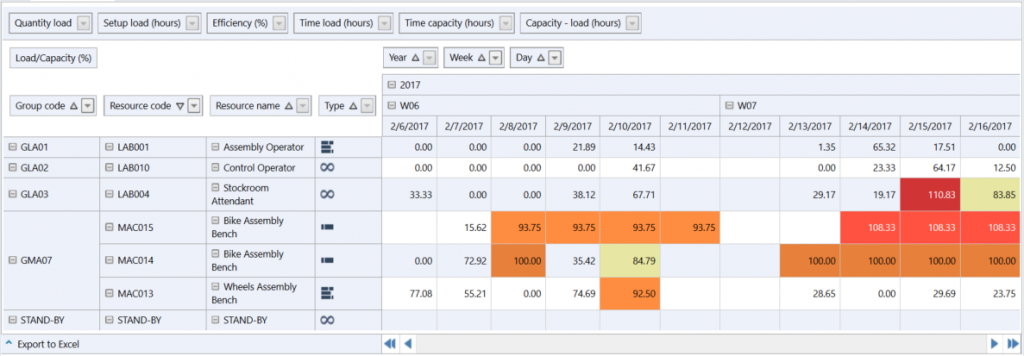
With this screen the planner can immediately identify in a time line the load of the work centres (WC). The capacity planning of the colours alert planner on the infinite capacity overloaded WC (Work Centre) and on the WC that almost reach their maximum capacities. All these WC are potential Bottleneck in the Shop floor flow. As a result, the planner would be able to set production controls on the system itself to minimize overloading.
The Resource Gantt Chart
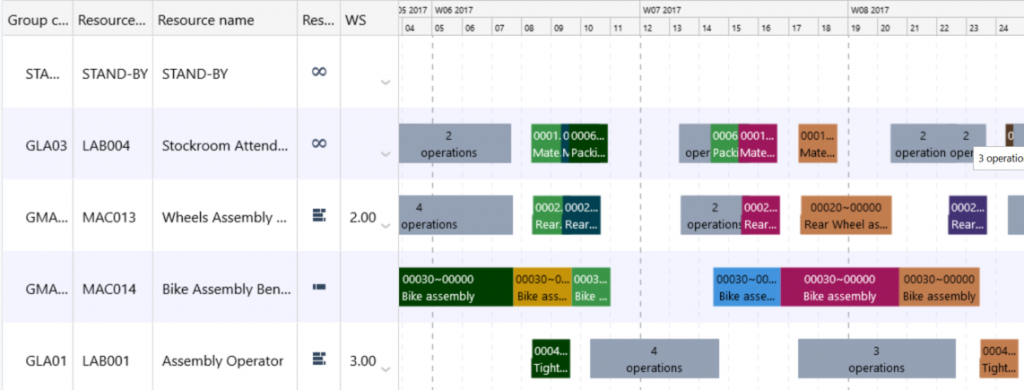
This graphical Gantt screen display the different operations running on the work centre. This is an easy to read screen with some colour highlight that can be defined by the planner Actually the different colours represent different work orders (WO). It means that the operations with the same colour belong to the same WO.
Resource Sequence Chart
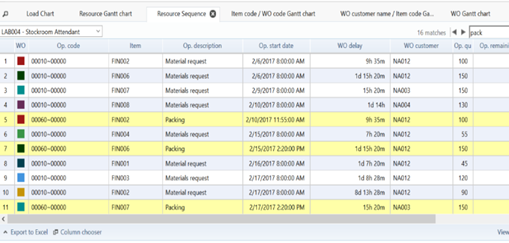
Very simple and useful view to optimized operation sequences on a WC. With this screen the planner can select a WC and see the positioning of all the operations going through it. Planer can make a full text research on the list and parametrized its content with the column chooser at the bottom of the screen.
The planner can then manually resequencing the operation by drag and drop. The operation colour highlight of the display tab is available. It can provide smart filters for grouping operation related to the same product or customer.
Why manufactures choice Sage EM for automating scheduling and production tasks?
Sage EM along with Sage Production Scheduler offer various benefits such as following:
- Sales and production forecasting – Sage EM enable strategic business planning and pursuing of future goals. These overall goals focus on various areas such as profitability, lead time, productivity, and other areas of the business. These goals are incredibly important in terms of driving the company and focusing efforts within the right areas based on accurate forecasting.
- Improve Efficiency – The biggest advantage of Sage EM is efficiency improvement. Sage EM oversees production and accommodates for any swift changes in scheduling and production, ultimately avoiding any wasted production. Also, It allows you to manage real time individual orders and generate achievable production schedules while considering shop floor constraints.
- Increased Visibility – Visibility within your supply chain is key. Sage EM allows you to display need-to-know information in a simple manner that is easy to understand.
- Shortage Prevention – Prevent any form of inventory shortage or mishaps within scheduling. This will save money through preventing waste or high holding cost.
- Improve on time delivery and shorten production cycle times
- Centralize planning and share information more effectively with internal and external customers and suppliers that facilitates effective demand & supply management.
- Reduce working capital and gain better visibility across the manufacturing process
With all the benefits associated with Sage EM and SPS, Sage EM is becoming a top choice for manufacturers that wish to take production to the next level.
In the News…
More Blogs…
ZILLIONe Launches Managed Security Services powered by Microsoft Security Solutions
ZILLIONe today launched the Managed Security Services powered by Microsoft Security solutions in South East Asia New Markets (SEA NM). The managed services include a Shared Security Operations Center powered by Microsoft Azure Sentinel and, Microsoft 365 Defender.
ZILLIONe Launches Microsoft Solutions in Maldives
A Successful journey of Sri Lanka’s 2nd oldest IT company “ZILLIONe”
ZILLIONe together with SmartStream provides reconciliations solution to People’s Bank of Colombo
A Successful journey of Sri Lanka’s 2nd oldest IT company “ZILLIONe”
EnviSage 2020
Visual process flow is one of the unique and interactive features which is available in Sage 300 ERP that provides – Navigation Made Easy Inside the ERP By Dulantha Iddamalgoda